RustFS 启动源码的入口不难找,难的是读到 RUSTFS_VOLUMES 之后不要把“监听地址”“全局状态”“endpoint 拓扑”“纠删码比例”混成一件事。
本文沿一次真实 Docker 实验环境读启动链路:8 个 RustFS 容器节点,每个节点 2 块盘,启动参数是两个 pool 表达式:
http://node{1...4}:9000/data{1...2} http://node{5...8}:9000/data{1...2}这条链路会经过 async_main()、run(config)、init_startup_listen_context() 和 init_startup_storage_foundation()。最后得到的不是单机 erasure,而是 SetupType::DistErasure;每个 pool 自动选择 1 个 8-drive set;默认 STANDARD storage class 下,8-drive set 的 EC 是 4+4。
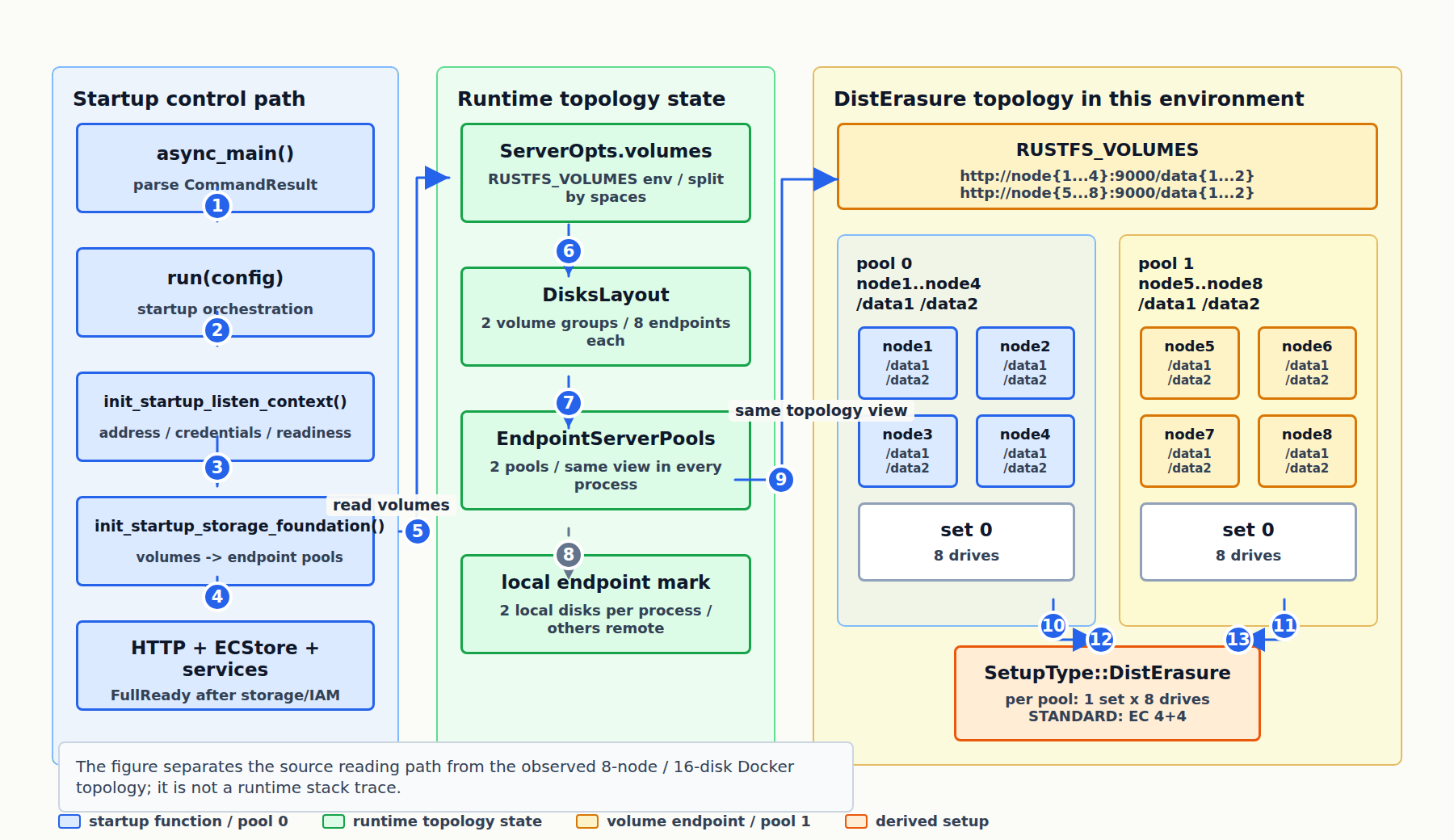 Fig. 这张图是源码阅读地图,不是运行时调用栈截图:左侧沿启动主干走到 storage foundation,中间记录
 ServerOpts.volumes、DisksLayout 和 EndpointServerPools 的状态转换,右侧把本文环境展开成 2 pool / 8 节点 / 16 endpoint,并落到 SetupType::DistErasure 与默认 EC 4+4。
目录
- 1 阅读入口:先从实际操作牵住源码
- 2 async_main:把进程输入变成启动配置
- 3 run(config):启动总编排
- 4 init_startup_listen_context:准备监听上下文
- 5 action credentials:进程内 OnceLock 全局凭证
- 6 init_startup_storage_foundation:从 volumes 到 endpoint pools
- 7 为什么 8 个 endpoint 自动形成 1 个 8-drive set
- 8 EC 是 4+4 还是 6+2
- 9 小结
- 参考资料
1 阅读入口:先从实际操作牵住源码
RustFS 是一个 workspace。主服务在 rustfs/ crate,存储核心在 crates/ecstore。读源码时先不要从 ecstore 直接下钻,它太大;更稳的入口是启动和一次 S3 请求。
启动链路的主路径在这些文件里:
rustfs/src/main.rs
rustfs/src/startup_entrypoint.rs
rustfs/src/startup_server.rs
rustfs/src/startup_storage.rs
rustfs/src/startup_services.rs
rustfs/src/startup_lifecycle.rs
请求链路可以后面再看:
server/http.rs
storage/ecfs.rs
storage/access.rs
app/object_usecase.rs
crates/ecstore/src/store/mod.rs
crates/ecstore/src/set_disk/mod.rs
本文先只读启动。因为启动过程会回答几个基础问题:
Config是怎么从 CLI/env 变成运行时配置的;- HTTP server 为什么可以先监听,但普通请求还会被 readiness gate 拦住;
RUSTFS_VOLUMES如何变成 pool、set、endpoint;- 当前进程怎么判断哪些 disk 是 local,哪些是 remote;
- 8-drive set 默认为什么是 EC 4+4。
2 async_main:把进程输入变成启动配置
二进制入口很薄:
fn main() {
    rustfs::startup_entrypoint::run_process();
}
run_process() 创建 Tokio runtime,然后 block_on(async_main())。真正的分流在 async_main():
async fn async_main() -> Result<()> {
    let env_compat_report = bootstrap_external_prefix_compat()?;

    let args: Vec<String> = std::env::args().collect();
    let command_result = match Opt::parse_command(args) {
        Ok(result) => result,
        Err(e) => {
            emit_fatal_stderr("Command parse failed", e);
            std::process::exit(1);
        }
    };

    let config = match command_result {
        CommandResult::Info(opts) => {
            crate::config::execute_info(&opts);
            return Ok(());
        }
        CommandResult::Tls(opts) => return crate::tls::execute_tls(&opts),
        CommandResult::Server(config) => config,
    };

    init_startup_server_preflight(&config, &env_compat_report).await?;
    run(*config).await
}
这里的 match 匹配的是 RustFS 自己的 enum:
pub enum CommandResult {
    Server(Box<super::Config>),
    Info(InfoOpts),
    Tls(TlsOpts),
}
Opt::parse_command(args) 先用 clap 解析 CLI 和环境变量,再把 clap 的 Commands 转成 CommandResult。所以:
std::env::args()
  -> Opt::parse_command()
  -> Cli { command: Option<Commands> }
  -> CommandResult
  -> async_main 里按 Info / Tls / Server 分流
只有 CommandResult::Server(config) 会继续启动服务。Info 和 Tls 是工具型子命令,执行完直接返回。
这里还有一个 Rust 细节:Server(Box<Config>) 把配置放在堆上。后面的 run(*config).await 里的 *config 是把 Box<Config> 解开,拿到真正的 Config。
3 run(config):启动总编排
run(config) 是启动流程的目录页:
async fn run(config: Config) -> Result<()> {
    let StartupListenContext {
        readiness,
        server_addr,
        server_address,
    } = init_startup_listen_context(&config).await?;

    let endpoint_pools =
        init_startup_storage_foundation(&server_address, &config.volumes).await?;

    let StartupHttpServers {
        state_manager,
        s3_shutdown_tx,
        console_shutdown_tx,
    } = init_startup_http_servers(&config, readiness.clone()).await?;

    let StartupStorageRuntime {
        store,
        shutdown_token: ctx,
    } = init_startup_storage_runtime(server_addr, &endpoint_pools, readiness.clone()).await?;

    let service_runtime = init_startup_runtime_services(
        &config,
        endpoint_pools,
        store.clone(),
        ctx.clone(),
        readiness.clone(),
        state_manager.clone(),
    )
    .await?;

    run_startup_runtime_lifecycle(StartupRuntimeLifecycle {
        server_address,
        state_manager,
        s3_shutdown_tx,
        console_shutdown_tx,
        service_runtime,
        store,
        shutdown_token: ctx,
        readiness,
    })
    .await
}
这个函数本身不做太多细节,而是把每一步产物传给下一步:
listen context
  -> readiness + server_addr + server_address

storage foundation
  -> endpoint_pools

HTTP servers
  -> shutdown handles + service state

storage runtime
  -> ECStore + CancellationToken

runtime services
  -> IAM / bucket metadata / notification / scanner 等运行期服务

lifecycle
-> ready log -> wait shutdown -> graceful stop有一个容易误解的顺序:init_startup_http_servers 在 init_startup_storage_runtime 之前。也就是 HTTP 端口可以先监听,但普通 S3 请求还不能自由进入业务处理。HTTP 层有 ReadinessGateLayer:
fn readiness_gate_blocks_path(path: &str, readiness: &GlobalReadiness) -> bool {
    !is_probe_path(path) && !readiness.is_ready()
}

if readiness_gate_blocks_path(path, &readiness) {
    return Ok(service_not_ready_response());
}
所以“端口已经监听”和“服务已经 FullReady”是两件事。
4 init_startup_listen_context:准备监听上下文
init_startup_listen_context 不启动 HTTP,也不碰磁盘。它做的是启动前上下文准备:
pub(crate) async fn init_startup_listen_context(config: &Config) -> Result<StartupListenContext> {
    log_sanitized_server_config(config);
    let readiness = Arc::new(GlobalReadiness::new());

    if let Some(region_str) = &config.region {
        region_str
            .parse::<s3s::region::Region>()
            .map(startup_runtime_sources::publish_region)
            .map_err(|err| Error::other(format!("invalid region '{}': {}", region_str, err)))?;
    }

    let server_addr = parse_and_resolve_address(config.address.as_str()).map_err(Error::other)?;
    let server_port = server_addr.port();
    let server_address = server_addr.to_string();

    if config.is_using_default_credentials() {
        warn!(...);
    }

    info!(... "Starting RustFS server");

    init_startup_action_credentials(config)?;
    startup_runtime_sources::publish_server_port(server_port);
    startup_runtime_sources::publish_server_addr(&config.address).await;

    Ok(StartupListenContext {
        readiness,
        server_addr,
        server_address,
    })
}
拆开看:
log_sanitized_server_config(config)打安全版配置日志,不打印 access key / secret key。GlobalReadiness::new()创建启动状态机,初始是Booting。config.region被解析成s3s::region::Region并发布到全局状态。这里的 region 是 S3 协议层区域身份,不决定磁盘放置。parse_and_resolve_address(config.address)把0.0.0.0:9000变成SocketAddr。config.is_using_default_credentials()检查是否仍在用默认 root credential。init_startup_action_credentials(config)把 root credential 注册到进程内全局凭证。- 发布 server port 和 server addr。
返回值是一个结构体:
pub(crate) struct StartupListenContext {
    pub(crate) readiness: Arc<GlobalReadiness>,
    pub(crate) server_addr: SocketAddr,
    pub(crate) server_address: String,
}
函数最后的:
Ok(StartupListenContext {
    readiness,
    server_addr,
    server_address,
})
等价于先构造 StartupListenContext,再包进 Ok(...)。调用处用结构体解构直接拿字段:
let StartupListenContext {
    readiness,
    server_addr,
    server_address,
} = init_startup_listen_context(&config).await?;
? 的意思是:如果返回 Err,run(config) 立刻返回错误;如果返回 Ok(context),就把 context 取出来继续解构。
这个函数为什么是 async?多数语义确实是同步的,关键只有这一行需要 .await:
startup_runtime_sources::publish_server_addr(&config.address).await;它最终写的是 tokio::sync::RwLock:
pub static GLOBAL_RUSTFS_ADDR: LazyLock<RwLock<String>> =
    LazyLock::new(|| RwLock::new("".to_string()));

pub async fn set_global_addr(addr: &str) {
    *GLOBAL_RUSTFS_ADDR.write().await = addr.to_string();
}
所以 init_startup_listen_context 是被内部异步全局状态 API 传染成 async 的。
5 action credentials:进程内 OnceLock 全局凭证
这里讨论过两个词:root credential 和 action credentials。
root credential 是配置层的管理员凭证:
RUSTFS_ACCESS_KEY
RUSTFS_SECRET_KEY
也就是:
config.access_key
config.secret_key
action credentials 是启动时把这组凭证注册到运行期全局状态后的形式:
startup_runtime_sources::init_action_credentials(
    config.access_key.clone(),
    config.secret_key.clone(),
)
继续追到 crates/credentials:
static GLOBAL_ACTIVE_CRED: OnceLock<Credentials> = OnceLock::new();

pub fn init_global_action_credentials(
    ak: Option<String>,
    sk: Option<String>,
) -> Result<(), CredentialsError> {
    let ak = match ak {
        Some(k) => k,
        None => gen_access_key(20)?,
    };

    let sk = match sk {
        Some(k) => k,
        None => gen_secret_key(32)?,
    };

    let cred = Credentials {
        access_key: ak,
        secret_key: sk,
        ..Default::default()
    };

    GLOBAL_ACTIVE_CRED
        .set(cred)
        .map_err(|_| CredentialsError::AlreadyInitialized)
}
这里的“全局”不是跨集群状态,也不是 Docker 容器之间共享变量。它是当前 RustFS 进程内的 static OnceLock<Credentials>。每个节点进程都有自己的一份。
OnceLock 只能设置一次。第一次 set(cred) 成功,后面再设置会返回 AlreadyInitialized。运行期读取用:
pub fn get_global_action_cred() -> Option<Credentials> {
    GLOBAL_ACTIVE_CRED.get().cloned()
}
可以把它理解成:
RUSTFS_ACCESS_KEY / RUSTFS_SECRET_KEY
  -> Config.access_key / Config.secret_key
  -> GLOBAL_ACTIVE_CRED.set(...)
  -> IAM / admin / internal operations 读取使用
6 init_startup_storage_foundation:从 volumes 到 endpoint pools
当前真实环境里,运行的是 8 个容器:
rustfs-dist-node1 ... rustfs-dist-node8每个容器的实际环境变量包含:
RUSTFS_VOLUMES=http://node{1...4}:9000/data{1...2} http://node{5...8}:9000/data{1...2}
RUSTFS_ACCESS_KEY=rustfsadmin
RUSTFS_SECRET_KEY=rustfsadmin
Docker 网络里,node1 到 node8 都能解析:
node1 -> 172.28.0.11
node2 -> 172.28.0.12
...
node8 -> 172.28.0.18
每个节点挂两块盘:
node1: /data1, /data2
node2: /data1, /data2
...
node8: /data1, /data2
回到函数:
pub(crate) async fn init_startup_storage_foundation(
    server_address: &str,
    volumes: &[String],
) -> Result<EndpointServerPools> {
    info!(... "Starting endpoint parsing");

    let (endpoint_pools, setup_type) =
        EndpointServerPools::from_volumes(server_address, volumes.to_vec()).await?;

    enforce_unsupported_fs_policy(&endpoint_pools)?;

    set_global_endpoints(endpoint_pools.as_ref().clone());
    update_erasure_type(setup_type).await;

    init_local_disks(endpoint_pools.clone()).await?;
    prewarm_local_disk_id_map().await;
    init_lock_clients(endpoint_pools.clone());

    log_storage_pool_layout(&endpoint_pools);

    Ok(endpoint_pools)
}
Step 1:from_volumes
EndpointServerPools::from_volumes 做两步:
pub async fn from_volumes(
    server_addr: &str,
    endpoints: Vec<String>,
) -> Result<(EndpointServerPools, SetupType)> {
    let layouts = DisksLayout::from_volumes(endpoints.as_slice())?;
    Self::create_server_endpoints(server_addr, &layouts).await
}
先把 RUSTFS_VOLUMES 变成 DisksLayout,再变成 EndpointServerPools + SetupType。
Step 2:DisksLayout 展开两个 pool
DisksLayout::from_volumes 会识别 ellipses:
let is_ellipses = args.iter().any(|v| has_ellipses(&[v]));当前两个参数都有 {...},所以是 ellipses 模式。每个参数单独形成一个 pool:
pool 0: http://node{1...4}:9000/data{1...2}
pool 1: http://node{5...8}:9000/data{1...2}
第一个 pool 展开成 8 个 endpoint:
http://node1:9000/data1
http://node1:9000/data2
http://node2:9000/data1
http://node2:9000/data2
http://node3:9000/data1
http://node3:9000/data2
http://node4:9000/data1
http://node4:9000/data2
第二个 pool 也展开成 8 个 endpoint:
http://node5:9000/data1
http://node5:9000/data2
...
http://node8:9000/data2
所以逻辑拓扑是:
2 pools
16 endpoints
8 nodes
2 disks per node
Step 3:Endpoint::try_from 解析 URL endpoint
每个字符串会变成 Endpoint:
pub struct Endpoint {
    pub url: Url,
    pub is_local: bool,
    pub pool_idx: i32,
    pub set_idx: i32,
    pub disk_idx: i32,
}
URL endpoint 会走:
Ok(mut url) if url.has_host() => {
    if !((url.scheme() == "http" || url.scheme() == "https")
        && url.username().is_empty()
        && url.fragment().is_none()
        && url.query().is_none())
    {
        return Err(Error::other("invalid URL endpoint format"));
    }

    ...
}
随后设置索引:
ep.set_pool_index(pool_idx);
ep.set_set_index(set_idx);
ep.set_disk_index(disk_idx);
例如在 pool 0:
node1/data1 -> pool_idx=0, set_idx=0, disk_idx=0
node1/data2 -> pool_idx=0, set_idx=0, disk_idx=1
...
node4/data2 -> pool_idx=0, set_idx=0, disk_idx=7
pool 1 类似,只是 pool_idx=1。
Step 4:update_is_local 判断本地和远端
每个节点使用同一份 RUSTFS_VOLUMES,但每个进程要知道哪些 endpoint 属于自己。
源码里调用:
pool_endpoint_list
    .update_is_local(server_addr.port(), &dns_retry_deadline)
    .await?;
在 node1 容器里:
node1:9000/data1 local
node1:9000/data2 local
node2..node8 remote
在 node5 容器里:
node5:9000/data1 local
node5:9000/data2 local
其他 remote
同一份拓扑在每个进程里保存,但 is_local 标记因节点而异。
Step 5:判断 SetupType::DistErasure
create_pool_endpoints 会收集唯一 host:port:
unique_args.insert(ep.host_port());当前环境得到:
node1:9000
node2:9000
...
node8:9000
unique_args.len() = 8。setup type 判断逻辑是:
let setup_type = match pool_endpoint_list.as_ref()[0].as_ref()[0].get_type() {
    EndpointType::Path => SetupType::Erasure,
    EndpointType::Url => match unique_args.len() {
        1 => SetupType::Erasure,
        _ => SetupType::DistErasure,
    },
};
因此当前环境是:
SetupType::DistErasure外层随后发布:
update_erasure_type(setup_type).await;它会设置:
GLOBAL_IS_DIST_ERASURE = true
GLOBAL_IS_ERASURE = true
Step 6:保存 EndpointServerPools
最终结构大致是:
EndpointServerPools [
  PoolEndpoints {
    legacy: false,
    set_count: 1,
    drives_per_set: 8,
    endpoints: node1/data1 ... node4/data2,
    cmd_line: "http://node{1...4}:9000/data{1...2}"
  },
  PoolEndpoints {
    legacy: false,
    set_count: 1,
    drives_per_set: 8,
    endpoints: node5/data1 ... node8/data2,
    cmd_line: "http://node{5...8}:9000/data{1...2}"
  }
]
然后写入进程内全局状态:
GLOBAL_ENDPOINTS
    .set(EndpointServerPools::from(eps))
    .expect("GLOBAL_ENDPOINTS should be initialized once during storage startup")
Step 7:初始化本地磁盘和锁客户端
init_local_disks(endpoint_pools.clone()).await? 不会把 16 个 endpoint 都初始化为本地盘。它只会根据 is_local 处理当前节点自己的 2 块盘。
例如 node1:
local disks:
  node1/data1 -> /data1
  node1/data2 -> /data2
prewarm_local_disk_id_map().await 会读取这些本地盘的 disk id 并缓存。
init_lock_clients(endpoint_pools.clone()) 则按 host:port 建锁客户端:
if endpoint.is_local {
    LocalClient::new()
} else {
    RemoteClient::new(endpoint.url.to_string())
}
在 node1 进程里:
node1:9000 -> LocalClient
node2:9000 -> RemoteClient
...
node8:9000 -> RemoteClient
7 为什么 8 个 endpoint 自动形成 1 个 8-drive set
当前每个 pool 的表达式是:
http://node{1...4}:9000/data{1...2}node{1...4} 是 4,data{1...2} 是 2。ArgPattern::total_sizes() 是乘法:
pub fn total_sizes(&self) -> usize {
    self.inner.iter().fold(1, |acc, v| acc * v.seq.len())
}
所以:
total_size = 4 * 2 = 8get_set_indexes 会从支持的 set size 中找能整除 8 的值:
const SET_SIZES: [usize; 15] =
    [2, 3, 4, 5, 6, 7, 8, 9, 10, 11, 12, 13, 14, 15, 16];
对 8 来说:
possible_set_counts(8) = [2, 4, 8]没有设置 RUSTFS_ERASURE_SET_DRIVE_COUNT 时,set_drive_count = 0,走自动选择:
common_set_drive_count(common_size, &set_counts)代入:
common_size = 8
set_counts = [2, 4, 8]
common_set_drive_count 会选择让 size / set_size 最小的合法 set size,也就是更大的 set size:
8 / 2 = 4 sets
8 / 4 = 2 sets
8 / 8 = 1 set
最终选择:
set_size = 8因此:
set_count = 1
drives_per_set = 8
如果显式设置:
RUSTFS_ERASURE_SET_DRIVE_COUNT=4则会得到:
set_count = 2
drives_per_set = 4
8 EC 是 4+4 还是 6+2
drives_per_set = 8 只说明一个 erasure set 里有 8 块盘。具体是 data + parity 还要看 storage class 的 parity 选择。
默认规则在 crates/ecstore/src/config/storageclass.rs:
pub fn default_parity_count(drive: usize) -> usize {
    match drive {
        1 => 0,
        2 | 3 => 1,
        4 | 5 => 2,
        6 | 7 => 3,
        _ => 4,
    }
}
8-drive set 代入:
default_parity_count(8) = 4所以默认 STANDARD storage class 是:
parity_blocks = 4
data_blocks = 8 - 4 = 4
EC 4+4
这不是 6+2。6+2 需要显式把 STANDARD parity 配成 2,例如:
RUSTFS_STORAGE_CLASS_STANDARD=EC:2本文环境里没有看到这个环境变量,所以结论是:
每个 pool: 1 个 8-drive set
默认 STANDARD EC: 4+4
9 小结
这次源码阅读可以压成一条主线:
async_main()
  -> parse CommandResult
  -> CommandResult::Server(config)
  -> run(config)
  -> init_startup_listen_context()
       readiness / region / address / action credentials
  -> init_startup_storage_foundation()
       RUSTFS_VOLUMES -> DisksLayout -> EndpointServerPools
       URL endpoints + 8 host:port -> SetupType::DistErasure
       local endpoint detection -> current process owns 2 local disks
  -> init_startup_http_servers()
  -> init_startup_storage_runtime()
  -> init_startup_runtime_services()
  -> FullReady
几个边界要分清:
region
  S3 协议层区域身份,不决定磁盘布局

root credential
  配置层 access_key / secret_key

action credentials
  注册进 OnceLock 后的进程内全局凭证

EndpointServerPools
  当前进程保存的集群拓扑

is_local
  同一份拓扑在不同节点进程里的本地/远端标记

drives_per_set = 8
  set 大小,不等于 EC 比例

EC 4+4
  默认 STANDARD parity 对 8-drive set 的结果
这套读法的价值不是背函数名,而是把运行现象落回源码里的状态转换:进程参数如何变成 Config,Config 如何变成启动上下文,RUSTFS_VOLUMES 如何变成分布式拓扑,最后 topology 和 storage class 如何共同决定 erasure set 与 EC 比例。
参考资料
- RustFS
ARCHITECTURE.md rustfs/src/startup_entrypoint.rsrustfs/src/startup_server.rsrustfs/src/startup_storage.rscrates/ecstore/src/layout/disks_layout.rscrates/ecstore/src/layout/endpoints.rscrates/ecstore/src/layout/endpoint.rscrates/ecstore/src/config/storageclass.rscrates/credentials/src/credentials.rs